Search that starts with what students actually need
Canvascope focuses on assignments, modules, readings, and due dates instead of generic AI theater.
Canvascope is the browser-side workspace for search and course indexing. Lectra is the iPad companion for Apple Pencil document work. The website now acts as the product portal and account shell for both.
Core posture
Local-first
Platforms
Canvas + Brightspace
Companion flow
Lectra PDF handoff
Why it works
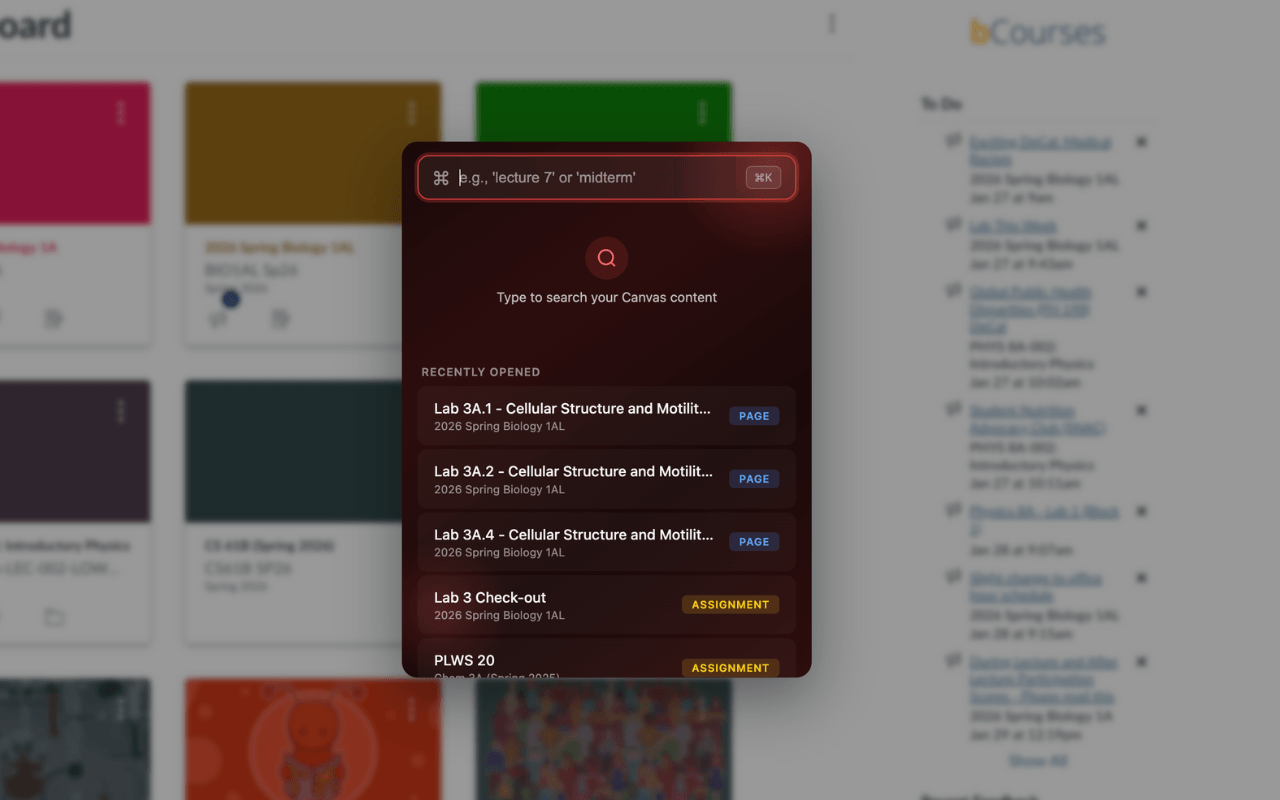
The extension already has a real interaction model: search overlay, course context, and recently opened work built from day-to-day usage.
What's new
The website now doubles as the signed-in workspace for courses, documents, and connected product activity.
How it works
Canvascope handles course indexing and search, Lectra handles PDF annotation, and the web app brings those flows together in one account workspace.
Canvascope focuses on assignments, modules, readings, and due dates instead of generic AI theater.
When a file matters enough to mark up, the extension can send it into the iPad workflow rather than forcing a copy-paste process.
Search indexing stays in local browser storage. Cloud flows only appear when the user explicitly signs in or syncs a document.
Instead of acting like a brochure, the new website is where users inspect synced documents, course coverage, and Course Brain artifacts.
The workflow
Sign in once, then move between the browser extension, document annotation on iPad, and the web workspace without losing context.
Canvascope scans course structure, due dates, and relevant LMS metadata into a local-first index.
Course snapshots and document handoffs only sync when the user opts into connected features.
The web app shows documents, course coverage, and Course Brain context through a real authenticated workspace.
Products
Canvascope remains the free flagship. Lectra stays focused on document annotation. The website now explains the system clearly and exposes the signed-in shell needed to make the ecosystem real.
Flagship product

Index Canvas and Brightspace content, search it fast, and keep the core corpus local to the browser.
Open product pageApple Pencil companion
Receive PDFs from Canvascope, annotate them on iPad, and keep document state visible across the same backend.
Open product pageYour workspace
The signed-in experience is built for real student work. Empty states stay honest, and synced records become useful without turning the site into a developer dashboard.
Open the workspace