Scope for Canvas, the free Chrome extension for Canvas and Brightspace
Search every Canvas and Brightspace course, one keystroke away.
Scope for Canvas is a free, local-first Chrome extension that searches everything in your Canvas and Brightspace courses and answers questions with citations to your own course materials. Press ⌘K anywhere in the browser and everything your instructors have posted is one search away, from files and pages to assignments, announcements, and scanned PDFs, all indexed on your device.
Press ⌘K from any page.
Scope opens over the course you are on and searches all of them at once.
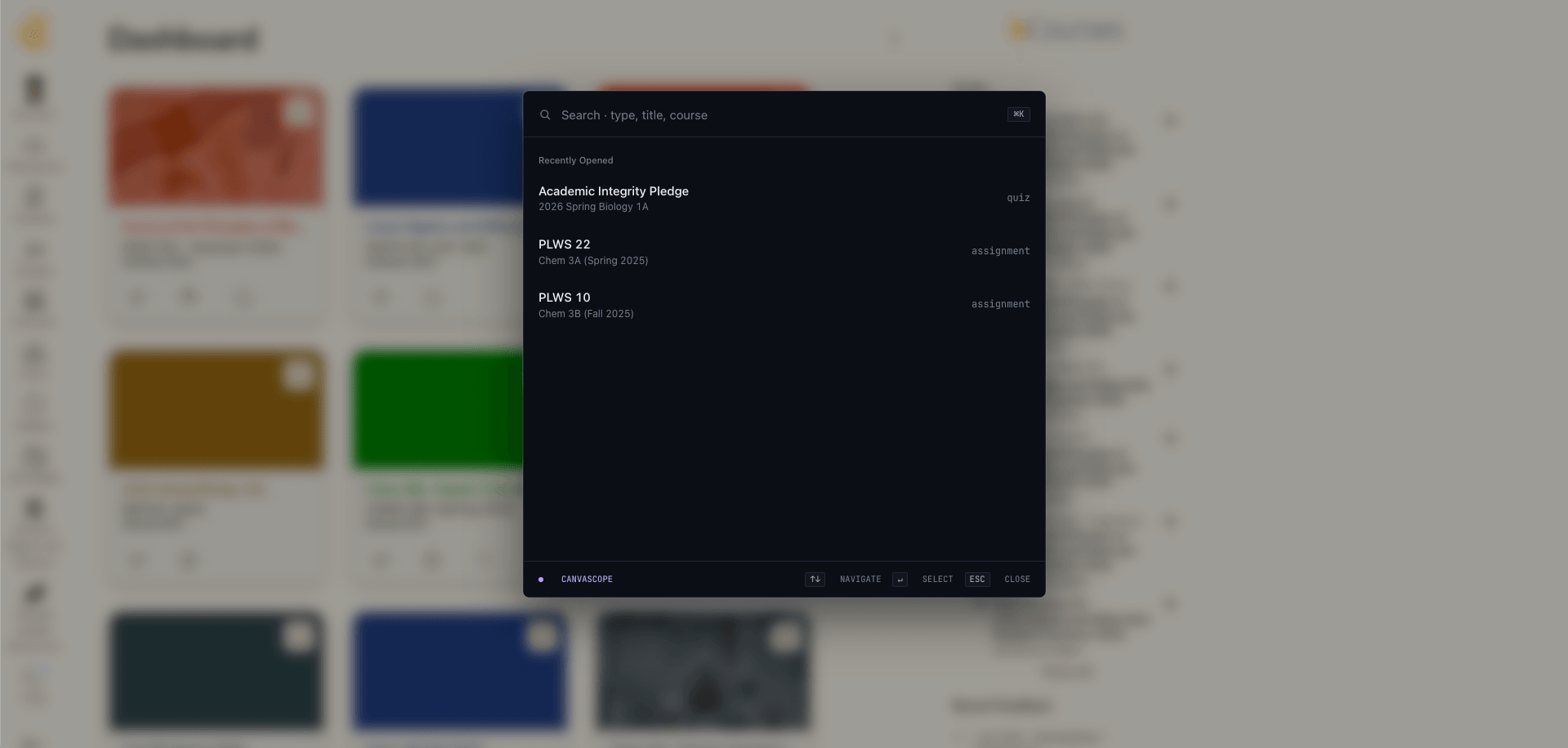
Everything the LMS knows, finally at hand.
Instant and local
Files, pages, assignments, announcements, and media across every course, including scanned PDFs. Search and indexing run entirely on your device.
Cited course answers
Ask when the midterm is or what the late policy says. Answers come from your materials, with the source page linked.
Exams from real material
Practice tests are generated from what the course actually covered, using the real material your instructors posted.
A planner that fills itself
Due dates gathered across courses, a morning briefing, and optional Google Calendar sync.
What-if calculator
See where you stand and what the final needs to be. It is computed on your device.
Hand off to iPad
Send a course file to Lectra Notes, mark it up, and bring the finished file back into supported upload flows.
What Scope for Canvas is
The short version: what it costs, where it runs, and where your course index lives.
| Feature | Scope for Canvas |
|---|---|
| Price | Free, no account required. |
| Browser | Chrome, and other Chromium browsers. |
| Works with | Canvas and Brightspace courses. |
| Where the index lives | Your browser, on your device. |
| AI answers | Chrome's on-device model first. When it is unavailable, an optional, clearly marked cloud fallback is used. |
| Version | 11.0.5 (checked September 17, 2026) |
| People using it | 104 across Scope for Canvas and Lectra Notes, counted by hand on August 27, 2026. How we count |
Swipe the table sideways to see every column.
Store facts checked on September 17, 2026.
- 0data sold
- 0subscriptions
The index is built and searched on your device. Features that reach the cloud, like practice-exam generation when the on-device model is unavailable, are explicit and optional, and they are clearly marked before anything is sent.
Send the reading to your iPad in one tap.
Send a PDF from Canvas to your iPad in one tap with the Scope extension, and finished files can come back into supported upload flows. Mark up lecture slides with Apple Pencil in Lectra Notes, the free iPad and iPhone app from Scope, then pick the annotated file from the browser in a supported upload flow when it's time to submit.
New to it? The guide to annotating lecture slides on iPad walks through the whole loop, from the course page to the finished PDF.
Questions people actually ask.
Is Scope free?
Yes. Scope for Canvas is a free Chrome extension. Install it from the Chrome Web Store and start searching your courses right away, with no subscription and no account required.
Does Scope work with both Canvas and Brightspace?
Yes. Scope searches across Canvas (Instructure) and Brightspace (D2L) courses, including assignments, readings, files, pages, and due dates.
How is Scope different from Canvas Smart Search?
Smart Search is Canvas's own search, and where a school has turned it on you use it from inside the course you are already in. Scope searches across every course you can open, including files, pages, assignments, and scanned PDFs, from anywhere in the browser, and it works whether or not your school has enabled Smart Search. What Smart Search offers is set by your school, so check what yours has turned on.
Is Scope a quiz-answer or homework-solver tool?
No. Scope answers questions from the materials your instructors posted and links every answer to its source. It does not take quizzes, write submissions, or interact with Canvas quiz logs.
Is a Canvas extension safe to install?
It depends entirely on the extension. Check what permissions it asks for, where your course data goes, and whether the developer says so plainly. Scope builds and searches its index on your device, and our guide walks through the questions worth asking before you install anything that can read your coursework. Read the Canvas extension safety guide.
Is Scope affiliated with Instructure or D2L?
No. Scope is an independent product from Scope Inc. It works with Canvas and Brightspace but is not made or endorsed by Instructure or D2L.
Where is my course data stored?
Scope is local-first. Your course index and search data live in your browser, on your device, by default. Connected features like Google sign-in, calendar sync, the cloud AI fallback, and the handoff to Lectra Notes only run when you explicitly choose them. The privacy policy lists everything the extension stores and syncs. Read the privacy policy.
Can Scope search inside PDFs?
Yes. Scope reads PDF text on your device and can read scanned pages and images, so their contents show up in future searches.
What are the cited AI answers?
Ask reads the course page you are on plus your indexed course files, tasks, notes, and PDF pages, then returns an answer with clickable [n] citations back to the source material. Answers try Chrome's on-device model first, and when it is unavailable an optional, clearly marked cloud fallback is used.
How does the Lectra Notes handoff work?
Send a PDF from Canvas to your iPad in one tap with the Scope extension. Mark it up with Apple Pencil in Lectra Notes, and finished files can come back into supported upload flows in the browser.
Open a course. Press ⌘K.
Works with Canvas and Brightspace